In this edition of the Explainers, we look at the Business Intelligence tools, which help management and individual traders monitor and analyse the Firm’s business flows at highly granular levels.
Business Intelligence consists of three main components:
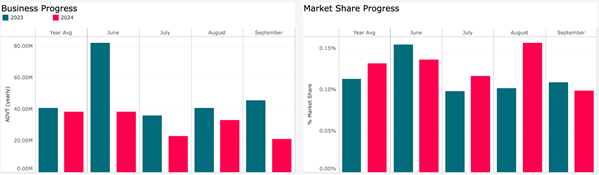
- The Business Summary dashboard shows how a Firm’s volumes and market share have progressed over recent months.
- The Concentration Heatmap; shows the distribution of a Firm’s flows among Sectors or Symbols, and by comparison to the overall Market.
- Daily Flows and Flows Summary: are two screens revealing the Firm’s long / short flows, also by Sector or Symbol.
The Business Intelligence section helps managers and client-facing staff identify the Firm’s progress and comparative strengths in the market versus previous periods.
Business Summary
Business Summary shows the evolution of monthly ADV and Market Share, and a drill down by Sector, Symbol, Trader ID and Trader Group (Trader Group enablement can be requested via [email protected]). Users can make seasonal and YTD comparisons to the prior year and choose to look back at previous months.
Concentration Heatmap
The Concentration Heatmap provides a detailed breakdown on the Firm’s distribution of flows by Symbol, Sector, Trader ID or Trader Groups. Users can quickly identify how business is concentrated (the box size) and whether it is aligned to the market’s concentration (green means more concentrated, blue means less).
Close alignment between the Firm’s distribution of flow with the market’s distribution is essential to maintaining or growing market share over time.

Daily Flows
Finally, Daily Flows gives a directional view of trading flows for a period up to 60 days. This is particularly useful for staff who need to keep their clients informed of the liquidity offered by the Firm across all business units.

How To Access the Service
If you are an existing user of the JSE Trade Explorer, please follow this link and login using your existing credentials:
https://jse.big-xyt.com/loginIf you are a new user, please register for the service by following this link https://jse.big-xyt.com/signup and follow the instructions.
Feedback, Suggestions and Support
Please send feedback, questions or issues to [email protected] or use the form on the “Contact Us” link in the footer of all user views. We would appreciate as much information as possible such as:
- name of the window,
- any non-default filter settings,
- date range,
- symbol or stock selected.